Author: Randy A Brown

  • Web Design Trends 2017 – Multi-purpose Themes

    Web Design Trends 2017 – Multi-purpose Themes

    Reading Time: 3 minutes

    [et_pb_section bb_built=”1″ admin_label=”Section” fullwidth=”on” specialty=”off”][et_pb_fullwidth_post_title admin_label=”Fullwidth Post Title” title=”on” meta=”on” author=”on” date=”on” categories=”on” comments=”on” featured_image=”on” featured_placement=”background” parallax_effect=”on” parallax_method=”on” text_orientation=”center” text_color=”light” text_background=”on” text_bg_color=”rgba(0,0,0,0.6)” use_border_color=”off” border_color=”#ffffff” border_style=”solid” custom_padding=”320px||320px|” title_font_size=”52px” title_font_size_phone=”42px” title_font_size_last_edited=”on|phone” /][/et_pb_section][et_pb_section bb_built=”1″ admin_label=”Section” fullwidth=”off” specialty=”off”][et_pb_row admin_label=”Row” make_fullwidth=”off” use_custom_width=”off” width_unit=”on” use_custom_gutter=”off” allow_player_pause=”off” parallax=”off” parallax_method=”off” make_equal=”off” parallax_1=”off” parallax_method_1=”off” custom_padding=”40px|80px|40px|80px” parallax_2=”off” parallax_method_2=”off” custom_padding_tablet=”20px|0px|20px|0px” custom_padding_last_edited=”on|phone”][et_pb_column type=”4_4″][et_pb_text admin_label=”Text” background_layout=”light” text_orientation=”left” use_border_color=”off” border_color=”#ffffff” border_style=”solid”]

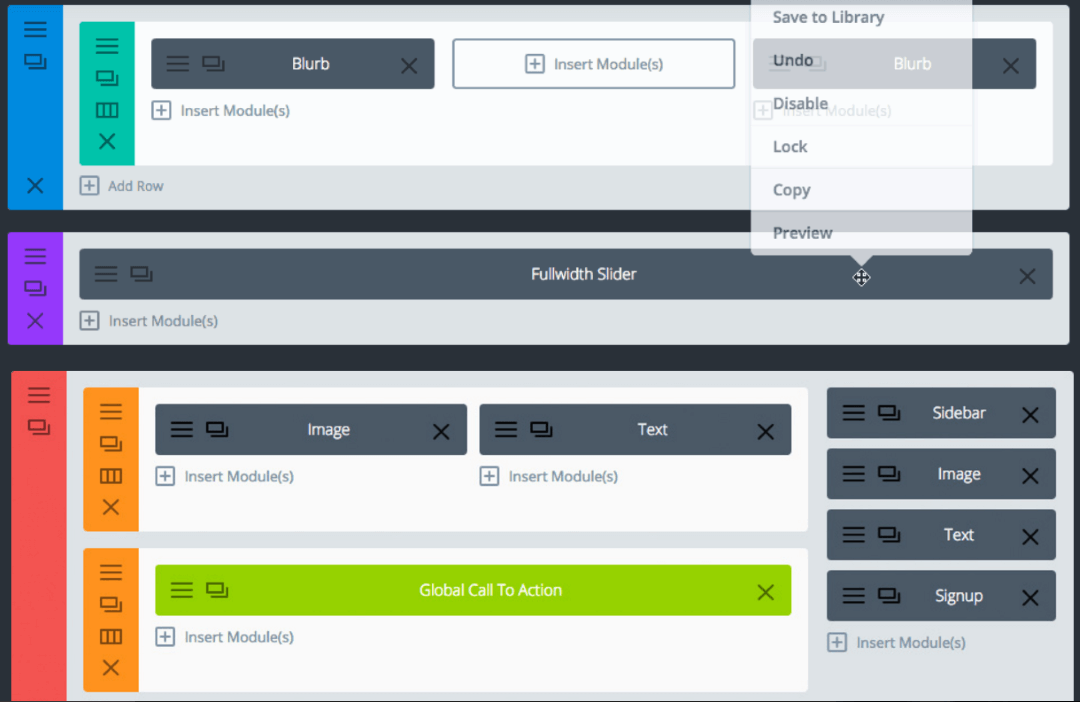
    Multi-purpose themes have been around for a few years but they’re gaining in popularity due to their versatility. They’re relatively inexpensive and you can use them to create any layout you want using the included drag-and-drop theme builders to create modular designs. Many include multiple child themes to help you get started quickly and you can modify the layouts to create something unique without having to start from scratch every time. This saves a lot of time and greatly reduces the difficulty in creating new layouts because it doesn’t require coding skills. They can also be expanded further using code, shortcodes, CSS, etc. The design can be as complex or as simple as you want it.

    A lot of designers/developers choose one or two to build from so they can build a library of layouts, plugins, etc., and save lots of time on each project because they’re familiar with how the theme works. Designers can create layouts and even share or sell them. Clients can choose from pre-made layouts which can save them money and get their website running faster, or they can choose to have the designer to create something unique just for them. The designer can use the same tools either way and the end result get’s the client exactly what they want.

    Multi-purpose themes can simplify the initial layout work, but still require design and/or development skills to create something unique or to add unique elements to pre-made designs. They don’t take away the need or advantage of hiring a designer or developer. At the same time, they’re great tools to get started and may even have what you need out of the box. They are great tools for beginners as well as advanced designers and developers. Some of them even have a large community to help with ideas and solve problems. The communities include Facebook groups, LinkedIn groups, forums, websites devoted to that specific theme, and marketplaces.

    Another advantage in using multi-purpose themes is it’s easier to teach clients to use a theme that the designer is the most familiar with. This also reduces support and maintenance time. The client can use the theme just like any WordPress theme or they can use the special features such as pre-made blog post templates.

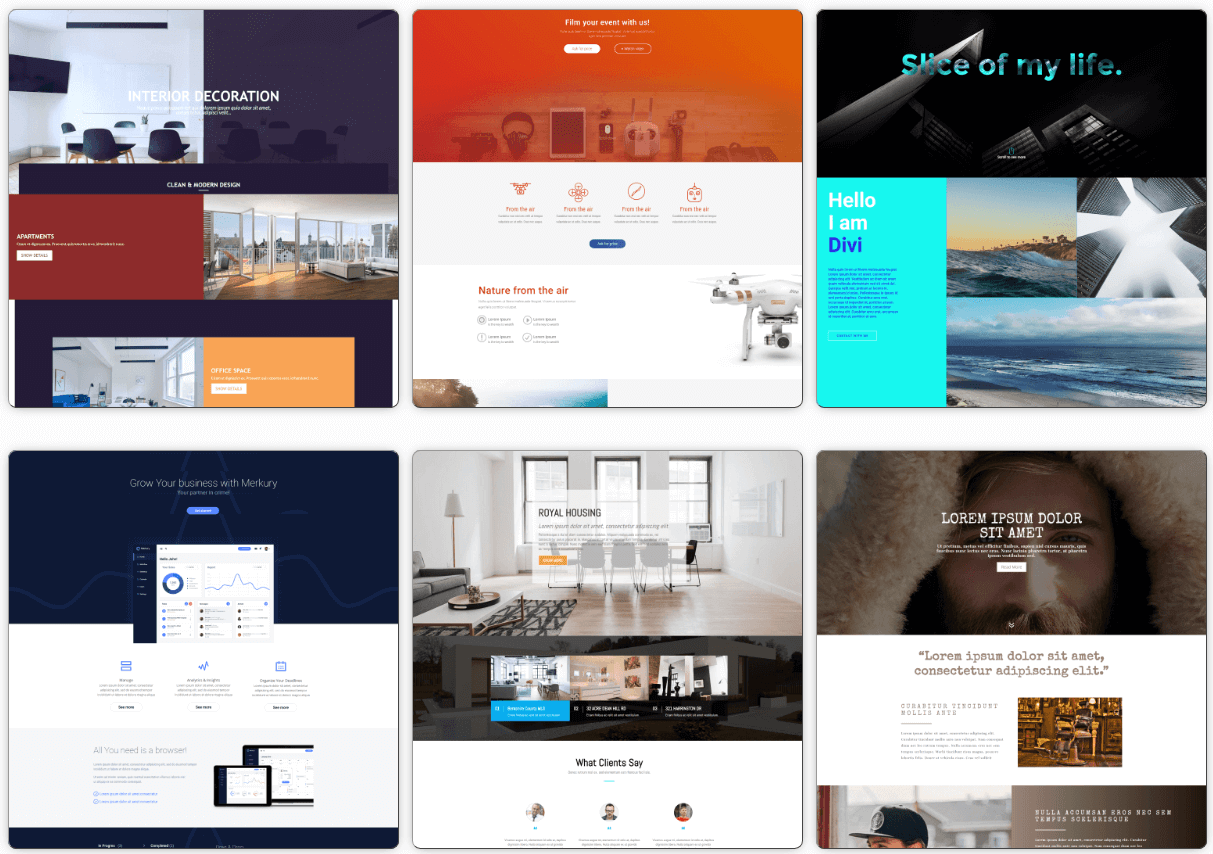
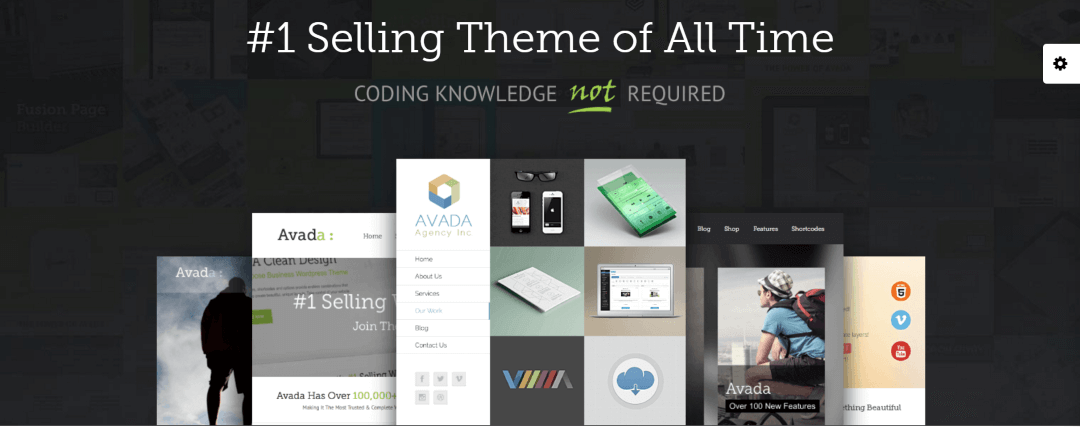
    The most popular themes include:

    This Website Uses a Multi-purpose Theme

    For reference, this site was built with Divi. It uses a drag-and-drop system that makes it easy to create layouts quickly. It includes lots of pre-made pages to help you get started and you can buy professionally made child-themes in the marketplaces.

    To create the site with Divi I created a page and placed my elements where I wanted them, created some dummy content, and tested the design. Once I decided on the final layout I use it to create the pages and post templates. The design you see now is the 5th version. Using the drag-and-drop elements it didn’t take that long to change my design. This layout can be recreated in just a few minutes with Divi. As you can guess, the hard part wasn’t building the layout – it was designing the layout.

    Let’s Discuss

    • Do you use multi-purpose themes?
    • Do you prefer to use pre-made layouts and modify them as needed?
    • What are your favorite multi-purpose themes?

    Let us know in the comments. Thanks for reading and please subscribe if you haven’t already. 

    Images used (except for the Divi Builder) are from the theme’s sales pages. 

    [/et_pb_text][/et_pb_column][/et_pb_row][/et_pb_section]
  • Web Design Trends for 2017 – Creative Typography

    Web Design Trends for 2017 – Creative Typography

    Reading Time: 2 minutes

    [et_pb_section bb_built=”1″ admin_label=”Section” fullwidth=”on” specialty=”off”][et_pb_fullwidth_post_title admin_label=”Fullwidth Post Title” title=”on” meta=”on” author=”on” date=”on” categories=”on” comments=”on” featured_image=”on” featured_placement=”background” parallax_effect=”on” parallax_method=”on” text_orientation=”center” text_color=”light” text_background=”on” text_bg_color=”rgba(0,0,0,0.6)” use_border_color=”off” border_color=”#ffffff” border_style=”solid” custom_padding=”320px||320px|” title_font_size=”52px” title_font_size_phone=”42px” title_font_size_last_edited=”on|phone” /][/et_pb_section][et_pb_section bb_built=”1″ admin_label=”Section” fullwidth=”off” specialty=”off”][et_pb_row admin_label=”Row” make_fullwidth=”off” use_custom_width=”off” width_unit=”on” use_custom_gutter=”off” allow_player_pause=”off” parallax=”off” parallax_method=”off” make_equal=”off” parallax_1=”off” parallax_method_1=”off” custom_padding=”40px|80px|40px|80px” parallax_2=”off” parallax_method_2=”off” custom_padding_tablet=”20px|0px|20px|0px” custom_padding_last_edited=”on|phone”][et_pb_column type=”4_4″][et_pb_text admin_label=”Text” background_layout=”light” text_orientation=”left” use_border_color=”off” border_color=”#ffffff” border_style=”solid”]

    Creative typography has been popular in the past few years and that trend continues. Fonts are getting larger and more creative, and text is getting more of the screen to itself – often taking up large blocks of the page.

    In the past fonts have been limited by screen resolutions. Most users had low resolution screens which made fancy fonts difficult to read. That’s not the case anymore. Even most smartphones have a resolution well above 1080. This opens up possibilities for creative font design. This means more serif’s, vintage, retro, and even custom fonts. Just be sure to keep it readable.

    Larger, Bolder

    Many designers are using larger typography for headers and logos to help create contrast and make the content look more interesting. This can be seen in themes like The 7 (The Creative Agency demo shown here). Popular blogs are using larger and modern fonts. For example, Elegant Themes just updated their website for a cleaner look and are using sans serif (a Google font called Poppins) for their headers and titles. WPMUDEV continues to use sans serif fonts (Monaco). Both use large titles.

    Text is becoming animated, highlighted with color, etc. Typography is being used within backgrounds. I’m seeing more drop-caps than ever before. I suspect as designers focus on how the typography layout looks on screen we’ll see more multi-column layouts with overlapping images, drop-caps, headers, etc. I’m also seeing larger fonts being used. I’ve also seen fonts used more creatively within layouts and sometimes having a large portion of the screen to itself.

    Font Pairing

    Font pairing is the science of matching typography to the content. Many websites simply use the default font that came with the theme. Using font pairing, a designer will match the font to the genre they’re best suited for. This will actually help in communicating with the audience. Font pairing makes the site look more professional and I expect to see it become more popular in 2017.

    For a great resource on font pairing see the articles

    Let’s Discuss

    • Do you use large fonts?
    • Do you prefer fonts that are more creative?
    • Have you tried font pairing?

    Let us know in the comments. Thanks for reading, and please subscribe if you haven’t already. 

    Featured image by Clem Onojeghuo

    [/et_pb_text][/et_pb_column][/et_pb_row][/et_pb_section]

  • Web Design Trends for 2017 – Improved Popup Options

    Web Design Trends for 2017 – Improved Popup Options

    Reading Time: 4 minutes

    [et_pb_section bb_built=”1″ admin_label=”Section” fullwidth=”on” specialty=”off”][et_pb_fullwidth_post_title admin_label=”Fullwidth Post Title” title=”on” meta=”on” author=”on” date=”on” categories=”on” comments=”on” featured_image=”on” featured_placement=”background” parallax_effect=”on” parallax_method=”on” text_orientation=”center” text_color=”light” text_background=”on” text_bg_color=”rgba(0,0,0,0.5)” use_border_color=”off” border_color=”#ffffff” border_style=”solid” custom_padding=”320px||320px|” title_font_size=”52px” custom_padding_tablet=”220px||220px|” custom_padding_phone=”120px||120px|” custom_padding_last_edited=”on|phone” title_font_size_phone=”42px” title_font_size_last_edited=”on|phone” /][/et_pb_section][et_pb_section bb_built=”1″ admin_label=”Section” fullwidth=”off” specialty=”off”][et_pb_row admin_label=”Row” make_fullwidth=”off” use_custom_width=”off” width_unit=”on” use_custom_gutter=”off” allow_player_pause=”off” parallax=”off” parallax_method=”off” make_equal=”off” parallax_1=”off” parallax_method_1=”off” custom_padding=”40px|80px|40px|80px” parallax_2=”off” parallax_method_2=”off” custom_padding_tablet=”20px|0px|20px|0px” custom_padding_last_edited=”on|tablet”][et_pb_column type=”4_4″][et_pb_text admin_label=”Text” background_layout=”light” text_orientation=”left” use_border_color=”off” border_color=”#ffffff” border_style=”solid”]

    Popups were once a very popular method for displaying ads. They became so annoying that users started using popup blockers (or throwing their monitors out the window in frustration… not that I ever did, but I was tempted a few times. Even the programmer who developed the code to use ads within popups apologized for creating the code). The popups then became pop-under’s until they started getting blocked too. Even today’s web browsers still have popup blockers built in and turned on by default. There are still a few out there but popup ads are no where near as bad as they used to be.

    Image source: https://cdn.theatlantic.com/static/mt/assets/science/Pop-UpAdsWiki-Post.jpg

    The Move From Ads to Newsletters

    What’s popular today is the use of popups for newsletter subscription notices. In my opinion these are no less annoying than popup ads of yesteryear. Most sites that use them only have one popup per page instead of a half dozen or more, so there’s that. Fortunately there are alternatives.

    The most popular type of popup today is the newsletter signup form. It usually includes a message with a free gift that either pops up on load, after a few seconds, after you scroll, or as your mouse goes to the address bar. There’s no denying that it works. However, if it’s overdone it can be extremely annoying – especially if the reader has already subscribed.

    Many sites have figured out better methods to get readers to subscribe than annoy them with constant popups. Some provide offers within their content, some use cookies to hide them, others have moved them to the corner, and others have removed them completely. Here are a few of the newsletter popup alternatives that are trending for 2017.

    Call to Action Within Content

    One example is the approach that Elegant Themes has taken as seen here in the free download called Coffee House by Olga Summerhayes. Rather than have popups about their newsletter, they create free downloads within their content. To get the download you simply click the download button and enter your email address. You’re then signed up to their email list and the download button appears immediately on screen.

    Cookies

    Another option is to use cookies to determine if the user has opted in or chosen not the see the popup. This example is a plugin for Divi from SA Web Solution called Divi Multi Modal uses this type of cookie. The cookie is good for 30 days. Users can hide the popup by clicking the message in the corner.

    Corner Popups

    Some websites have moved the popup to the corner where readers can still see the screen. They started out as large modal windows that took up a decent chunk of the corner but they’re starting to become smaller. You can see in the example from wpmudev that this call to action (CTA) doesn’t get in the way of the content. Animation can call attention to the CTA without it becoming obnoxious. Also, they can deny it all they want too but that green guy is ROM.

    Message Bars

    One of the most popular methods is to use a message bar that remains at the top or bottom of the screen until the user clicks to close it. As you can see in this example from WP Theme Roundups, this message bar is small enough not to get in the way yet stands out enough to alert readers to your newsletter. They can be styled to match your branding or you can make them stand out to keep them from becoming invisible.

    Let’s Discuss

    1. Do you use popup ads?

    2. Do you use popups for your newsletters or do you use another method?

    3. What is your favorite method for newsletters?

    Let us know in the comments. Thanks for reading and please subscribe if you haven’t already.

    Featured Image by Simson Petrol

    [/et_pb_text][/et_pb_column][/et_pb_row][/et_pb_section]
  • Web Design Trends for 2017 – Material Design

    Web Design Trends for 2017 – Material Design

    Reading Time: 3 minutes

    [et_pb_section bb_built=”1″ admin_label=”Section” fullwidth=”on” specialty=”off”][et_pb_fullwidth_post_title admin_label=”Fullwidth Post Title” title=”on” meta=”on” author=”on” date=”on” categories=”on” comments=”on” featured_image=”on” featured_placement=”background” parallax_effect=”on” parallax_method=”on” text_orientation=”center” text_color=”light” text_background=”on” text_bg_color=”rgba(0,0,0,0.5)” use_border_color=”off” border_color=”#ffffff” border_style=”solid” custom_padding=”320px||320px|” title_font_size=”52px” title_font_size_last_edited=”on|phone” custom_padding_tablet=”220px||220px|” custom_padding_phone=”120px||120px|” custom_padding_last_edited=”on|phone” title_font_size_phone=”42″ /][/et_pb_section][et_pb_section bb_built=”1″ admin_label=”Section” fullwidth=”off” specialty=”off”][et_pb_row admin_label=”Row” make_fullwidth=”off” use_custom_width=”off” width_unit=”on” use_custom_gutter=”off” allow_player_pause=”off” parallax=”off” parallax_method=”off” make_equal=”off” parallax_1=”off” parallax_method_1=”off” custom_padding=”40px|80px|40px|80px” parallax_2=”off” parallax_method_2=”off” custom_padding_tablet=”20px|0px|20px|0px” custom_padding_last_edited=”on|tablet”][et_pb_column type=”4_4″][et_pb_text admin_label=”Text” background_layout=”light” text_orientation=”left” use_border_color=”off” border_color=”#ffffff” border_style=”solid”]

    Material Design is Google’s web design principles that are basically a digital version of classic principles of good design. It uses visual cues for surfaces that are clickable and bold typography and vibrant color. It uses shadow and edges to show what can be clicked. Google has created lots of guidelines, resources, and tools, and since Google is behind it you can bet it will continue to grow in popularity.

    Where flat design once ruled I see material design taking over. Flat design will continue to be used and even evolve to be more useful. However, it’s still limited. For example, flat design doesn’t have shading which can make it difficult to tell what is clickable (note – there are ways to achieve shading in flat design but that’s not typical). Shading looks better in many situations and Material Design is better suited for shading. Google explains all the details in their guidelines.

    Material Design Blog

    One of the best examples of putting Material Design to use is Google’s Material Design Blog.  They have a similar layout to mine. I designed mine first, they just started their blog before I did. Yeah, I’m going with that.

    Material Design Themes

    Websites will focus on Google’s Material Design principles while developing their styles and designs in order to stand apart from the crowd. There are lots of themes built around Material Design to help you get started. There’s a nice list at Theme Forest. Here are a few examples…

    WordPress Material Design

    BeMaterial is a premium theme from BeThemes fully incorporates Material Design and a lot of design trends that I’m starting to see implemented on other websites. It’s built with the idea of online community engagement. It includes a modular drag-and-drop front page module builder, one-page parallax, AJAX portfolio, and unlimited typography and colors. Other features include image and video backgrounds, slider, more than 25 page transition effects, over 30 CSS animations, Magnific image gallery, and more.

    Zephyr

    Zephyr is a premium theme from UpSolution that won Evanto’s Material Design Most Wanted competition. It includes a header builder which lets you place any custom element within the header. It includes multiple sliders, portfolios, blogs, elements, advanced typography, pages, 1273 icons, and unlimited colors. Design your layout using the built-in drag-and-drop page builder or use one of the pre-made layouts.

    Let’s Discuss

    1. Do you follow Material Design Principles?

    2. What are your favorite Material Design tools?

    3. What are your favorite Material Design Themes?

    Let us know in the comments. Thanks for reading and please subscribe if you haven’t already.

    Featured Image from Google’s Material Guidelines

    [/et_pb_text][/et_pb_column][/et_pb_row][/et_pb_section]

  • Google Introduces Upside-down Websites

    Google Introduces Upside-down Websites

    Reading Time: 2 minutes

    [et_pb_section bb_built=”1″ admin_label=”Section” fullwidth=”on” specialty=”off”][et_pb_fullwidth_post_title admin_label=”Fullwidth Post Title” title=”on” meta=”on” author=”on” date=”on” categories=”on” comments=”on” featured_image=”on” featured_placement=”background” parallax_effect=”on” parallax_method=”on” text_orientation=”center” text_color=”light” text_background=”on” text_bg_color=”rgba(0,0,0,0.5)” use_border_color=”off” border_color=”#ffffff” border_style=”solid” custom_padding=”320px||320px|” title_font_size=”52px” custom_padding_tablet=”220px||220px|” custom_padding_phone=”120px||120px|” custom_padding_last_edited=”on|phone” title_font_size_phone=”42px” title_font_size_last_edited=”on|phone” /][/et_pb_section][et_pb_section bb_built=”1″ admin_label=”Section” fullwidth=”off” specialty=”off”][et_pb_row admin_label=”Row” make_fullwidth=”off” use_custom_width=”off” width_unit=”on” use_custom_gutter=”off” allow_player_pause=”off” parallax=”off” parallax_method=”off” make_equal=”off” parallax_1=”off” parallax_method_1=”off” custom_padding=”40px|80px|40px|80px” parallax_2=”off” parallax_method_2=”off” custom_padding_tablet=”20px|0px|20px|0px” custom_padding_last_edited=”on|phone”][et_pb_column type=”4_4″][et_pb_text admin_label=”Text” background_layout=”light” text_orientation=”left” use_border_color=”off” border_color=”#ffffff” border_style=”solid”]

    Footers are rarely seen in today’s websites. They not getting the love they used to because readers are not scrolling to the bottom of pages anymore. To find out why, I did what any web designer would do – ask random people on the streets.


    Random Guy

    “I don’t scroll all the way down,” said a random guy I met on the street, “because all that’s down there are hit counters and Flash animation. Besides,” Random Guy continued, “why scroll all the way down there when I can look at all of the shaking ads in the sidebars? I was the 100,000th visitor to every website I visited last week. That makes me kind of a big deal. They should be paying me…”

    Unfortunately our conversation was cut short, but Random Guy does make a good point. However, it’s not the 1970’s anymore and anyone who’s scrolled all the way to the bottom of a website in the past few months has noticed there are some really good designs in those footers. Designers want their readers to see those footers. Afterall, all web design is art, they put a lot of time into them, and the art must be viewed.

    Google Rep

    To help with this, Google has developed the upside-down website. “It just makes sense” said the Google rep, “since the goal is to get your readers to the bottom of the page… to just go ahead and start there. Plus, we have to do something new or the web is going to explode due to the 2018 web bug (which we don’t want to talk about).”

    The Google rep wanted me to strike that last comment but I used parenthesis instead. I hope he appreciates it.

    Google’s Upside-down Web Design Standards

    Here’s a look at a blog design using Google’s Upside-down Web Design Standards.

    As you can see… it’s… well… upside-down. The text and images are in the proper direction, but the footer is on top, followed by the oldest to newest post, and then the header and primary menu.

    Well it looks like we’re in for some interesting designs when the Upside-down Tool Kit is released later in the year. Until then, happy designing, and have a great April Fools Day!

    [/et_pb_text][/et_pb_column][/et_pb_row][/et_pb_section]

  • Web Design Trends for 2017 – Bold Color Choices

    Web Design Trends for 2017 – Bold Color Choices

    Reading Time: 3 minutes

    [et_pb_section bb_built=”1″ admin_label=”Section” fullwidth=”on” specialty=”off”][et_pb_fullwidth_post_title admin_label=”Fullwidth Post Title” title=”on” meta=”on” author=”on” date=”on” categories=”on” comments=”on” featured_image=”on” featured_placement=”background” parallax_effect=”on” parallax_method=”on” text_orientation=”center” text_color=”light” text_background=”on” text_bg_color=”rgba(0,0,0,0.5)” use_border_color=”off” border_color=”#ffffff” border_style=”solid” custom_padding=”320px||320px|” title_font_size=”52px” custom_padding_tablet=”220px||220px|” custom_padding_phone=”120px||120px|” custom_padding_last_edited=”on|phone” title_font_size_phone=”42px” title_font_size_last_edited=”on|phone” /][/et_pb_section][et_pb_section bb_built=”1″ admin_label=”Section” fullwidth=”off” specialty=”off”][et_pb_row admin_label=”Row” make_fullwidth=”off” use_custom_width=”off” width_unit=”on” use_custom_gutter=”off” allow_player_pause=”off” parallax=”off” parallax_method=”off” make_equal=”off” parallax_1=”off” parallax_method_1=”off” custom_padding=”40px|80px|40px|80px” parallax_2=”off” parallax_method_2=”off” custom_padding_tablet=”20px|0px|20px|0px” custom_padding_last_edited=”on|tablet”][et_pb_column type=”4_4″][et_pb_text admin_label=”Text” background_layout=”light” text_orientation=”left” use_border_color=”off” border_color=”#ffffff” border_style=”solid”]

    Color can have an influence on the reader. Readers expect certain colors for certain genres. Expect an increase in awareness of color choices. As designers explore and become more creative with color choices, I would also expect to see some creative ways that designers are successfully breaking the rules or blending genres.

    Purposefully Chosen Colors

    In the past website owners have chosen colors they enjoy rather than colors to affect their readership. For 2017 websites will focus more than ever on color choices specific to their audience and purpose. Color sets the mood, tone, thoughts, and even affects conversion. Colors should be chosen carefully.

    Color Psychology

    There’s a lot of science behind color theory and psychology. Here’s a short list of how color affects readers and how to know which colors you need based on your niche:

    • Black – sophistication, power, edginess, timeliness, seriousness – great choice for backgrounds.
    • White – cleanliness, purity, virtue, simplicity, seriousness – great choice for backgrounds and for minimal and simple sites.
    • Ivory – comfort, simplicity, elegance, softens colors, complementary – excellent for highlights, secondary, and background colors.
    • Gray – formal, neutral, sad, professional, traditional, seriousness, calmness – great choice for backgrounds.
    • Beige – humility, promotes the traits of surrounding colors – excellent for highlights, secondary, and background colors.
    • Red – importance, power, danger, youthful (bright colors), comforting (warm colors).
    • Pink – youthful, feminine, innocent.
    • Orange – friendliness, energy, movement, uniqueness.
    • Yellow – happiness, enthusiasm, youthful (bright shades – great for children), comfort (using middle shades), antiquity (using dark shades – great for showing authority), versatile.
    • Green – growth, stability (using dark shades – great for environmental and financial themes), relaxing, honesty (using lighter shades).
    • Blue – calm, safe, friendly, open (with lighter shades), reliable (with darker shades).
    • Purple – luxury, mystery (using darker shades), romance (using lighter shades).

    Pantone Color of the Year

    Pantone provides color palettes that work in many industries including graphic design with each year focusing on a single color. For 2017 Pantone has determined that the color of the year is green. More specifically, Greenery 15-0343. Pantone provides color-paring charts to create 10 palettes of neutral, bright, pastel, metallic, deeper shades, etc. Expect to see Greenery 15-0343 and its surrounding palettes used a lot in 2017 as the various shades are well-suited to many genres.

    Material Design’s Color Palettes

    Google’s Material Design is becoming more popular among designers and in turn so will its bright color palettes. Google’s Material Design Palette allows you to choose two colors and it provides a palette that works with those colors.

    Material UI

    Another Google Material Design tool is Material UI. This tool has lots of features to choose color palettes for flat UI, social, Material, metro, HTML, Hex, and lots more. I expect this tool to become even more popular for choosing color palettes.

    Let’s Discuss

    1. Do your color choices follow the common color trends?

    2. What are your favorite color tools?

    Let us know in the comments. Thanks for reading and please subscribe if you haven’t already. 

    Image by Kyler Nixon

    [/et_pb_text][/et_pb_column][/et_pb_row][/et_pb_section]

  • WP Design Trends

    WP Design Trends

    Reading Time: < 1 minute

    My new website, WPDesignTrends.com, is now live. This site is all about web design using WordPress. The focus is on the look and feel of the website with special attention to UX and UI. I will review themes, plugins, books, and courses. It also includes a job board where anyone post or apply for jobs within the WordPress industry.

    Please check it out and subscribe, share, and comment.

  • Top 5 Apps To Keep Your Website Secure

    Top 5 Apps To Keep Your Website Secure

    Reading Time: 4 minutes

    This guest post is from Kim DeLisle of SecureThoughts.com.

    I would like to thank Randy A. Brown for allowing me to contribute to the site! I love his musings on writing and the Bible, and he also writes some really great, practical articles like this one on Creating Amazon Affiliate Links in WordPress. If you haven’t already, make sure you take a look around once you’re done with this article!

    Top 5 Apps To Keep Your Website Secure

    Keeping your website secure is one of the top responsibilities of a webmaster. Not only do your security choices affect you (and possibly your livelihood) but also anyone who uses your site. (more…)

  • A Look at Lean Manufacturing and the Toyota Production System

    A Look at Lean Manufacturing and the Toyota Production System

    Reading Time: 16 minutes

    tps

    Lean is a buzzword in today’s workplace. It is especially popular in manufacturing industries. While most companies have their own version of lean, the fundamentals are the same. This article takes a look at lean manufacturing, defines it, discusses the key terms, and describes the advantages of implementing lean into the manufacturing process.

    Note – there are no industry secrets in this article. The content of this article is public knowledge. (more…)

  • Creating Amazon Affiliate Links in WordPress

    Creating Amazon Affiliate Links in WordPress

    Reading Time: 12 minutes

    Creating Amazon Affiliate Links in WordPress

    We’ve all seen Amazon affiliate links. They’re everywhere. Sometimes they have pictures of products and sometimes they’re just a string of blue underlined text that looks like we should click on them. When we do, it takes us to Amazon. When we buy something through this link, the person who owns the link gets a portion of the sell. You can easily add Amazon links to your own WordPress website. (more…)